Aphasia treatment software for recognition
and retrieval of letters and words.
Demo Video
Program shows the patient a letter, word, or picture and the patient
responds by choosing or typing an answer. If the answer is incorrect,
program gives the patient helpful hints.
Aphasic
patients
use it independently, thanks to special features,
starting with relearning the alphabet then identifying objects by
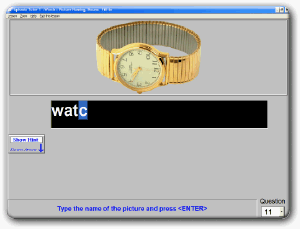
matching a word to a picture. At the highest levels, patient types the
name for everyday things like "apple" or "watch" or "clock".
This program is also available in Spanish.
Contains over 700 exercises in 8 difficulty Levels:
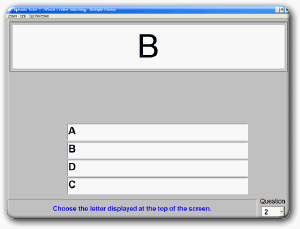
Letter Matching
Shows a letter and patient selects the matching letter from
a multiple-choice list. [View]
Letter Copying
Similar to #1, but patient must type answer.[View]
Word Matching
Pick the matching word from several choices.
[View]
Word Copying
Higher
level version of #2. Practice with basic
keyboard operation. [View]
Like all Bungalow programs, Aphasia Tutor 1 provides
hints and feedback to help guide the patient to the right answer. Our approach is "Success with as little assistance as needed." The goal is for the patient to do it as independently as possible.
Hints
User can click on
the Hints button or press the <control> key on the keyboard to receive a hint in the
fill-in-the-blank levels. E.g., if the answer was "Spoon" the hint would be
"s_ _ _ _"
Clear feedback for correct/incorrect answers.
Use the mouse or keyboard
Multiple difficulty levels beginning with multiple choice
single-letters, all the way to fill-in-the-blank words.
Spanish version
Available in a Spanish version that has the cues and answers in Spanish. Patient would pick a Spanish word for
"orange" (naranjo) or type that in as the answer.
Deluxe Version Features
These features are available in the Deluxe and Pro versions of
the program.
Get more therapy with extra difficulty options. Show the first letter of the answer
or reduce the number of choices to make the program easier, or give
fewer hints to make it harder.
Motivate the patient by
showing them how well they're doing with automatic progress
tracking which saves the results of each session are saved, to a
file. You can print this or copy it into other documentation.
Limited to a single patient. For unlimited patients,
see
Pro version
Make faster progress
with repetition practice.
Repeat the first 20 questions 5 times, or
repeat as many questions as you like as many times as you like.
You can also control the length of the lesson without repetition,
such as having a 25 exercise lesson. (Bungalow programs have
so many exercises we've found that even one lesson can be too much
for a patient to do in one sitting.
Do memory training. You can
set the program to display the cue to display temporarily or until
they press any key. Then the cue disappears, and the question
appears.
Pro version has all the features of the Deluxe (above) plus it:
Tracks progress for each patient
Makes paperwork a breeze!
You just open the patient's Bungalow file and paste in their
scores (results) from several sessions to demonstrate progress
during therapy.
Automatically remembers settings for each patient
So, when Mr.
Jones comes back in for his next visit, you just select Mr. Jones
and the program remembers how he did last time, what lesson he was
using, and what settings you used for him.
Two Computer license
Licensed for 2 PCs at one address (one building) and for multiple patients (users) on each PC. Contact us for discounts on multiple Pro licenses.

 Does the patient need to hear the words and cue?